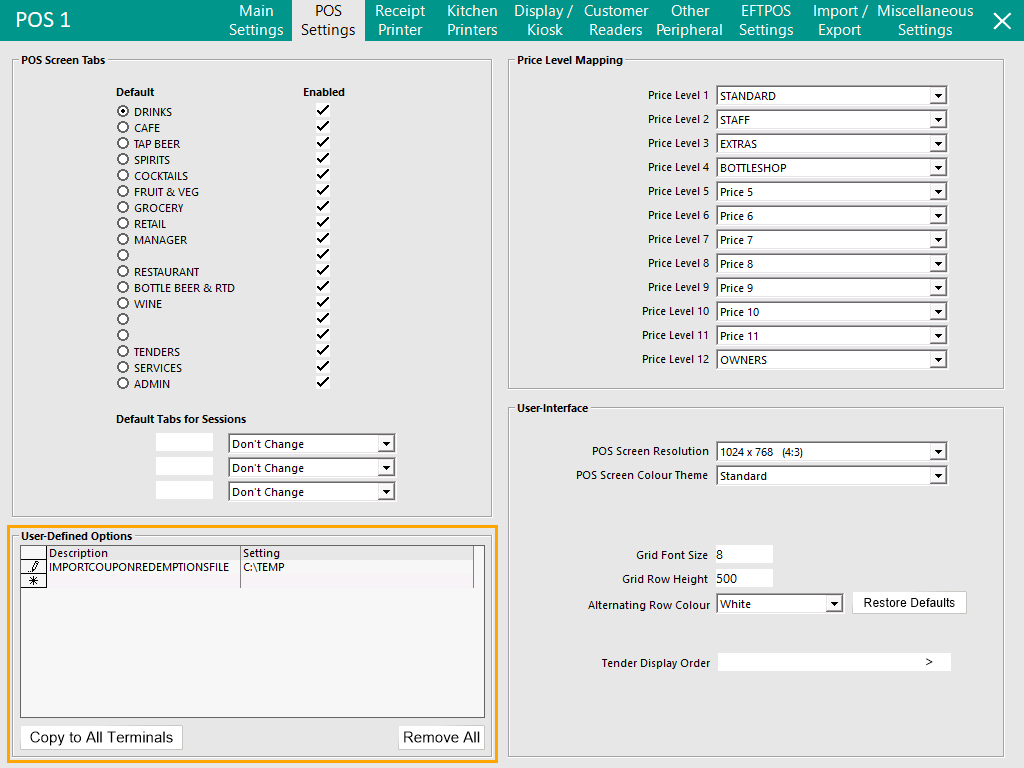
This functionality can be used to import Coupons via a User-Defined Option.
Note that Coupons imported with this functionality will be linked to Coupon ID 1/PromotionTableID 20001 (i.e. typically the first Coupon Promotion).
Also note that Imported Coupon Codes are all treated as Redeemed/Expired.
Therefore, this functionality is for importing redeemed Coupon Codes which may have been redeemed at another venue that should no longer be accepted at the current venue.
To configure and use this functionality, go to: Back Office > Setup > POS Terminals > Select a POS Terminal > Modify > POS Settings > User-Defined Options.
Note!
Ensure that the folder path configured in the below User-Defined Option will only be used for this functionality.
The folder must not contain any text files that are not related to the Import Coupon functionality.
It is therefore recommended that a specific folder is created and only used for this function.
Create the following User-Defined Option:
An Example Setting is shown below:
The contents of the Coupon Redemption File needs to contain a comma separated list of Coupon Codes.
The below is a sample list of Coupon Codes:
115939849,215939849,315939849,415939849
The below screenshot shows the Coupon Codes within a "CouponRedemptions.txt" file.

Copy the CouponRedemptions.txt file into the folder path configured in the User-Defined Option (e.g. C:\TEMP\).
Note that any filename can be used for the Coupon Redemption files.
Once the file has been copied to the Import Folder location, Idealpos will import the Coupon Codes.
The file will be removed after the Import has been completed.
All imported Coupon Codes will be treated as redeemed/expired.
The Date Redeemed will be recorded as the date which the Coupon Redemption was imported.
Attempting to redeem an Imported Coupon will display the following prompt on the POS Screen: